


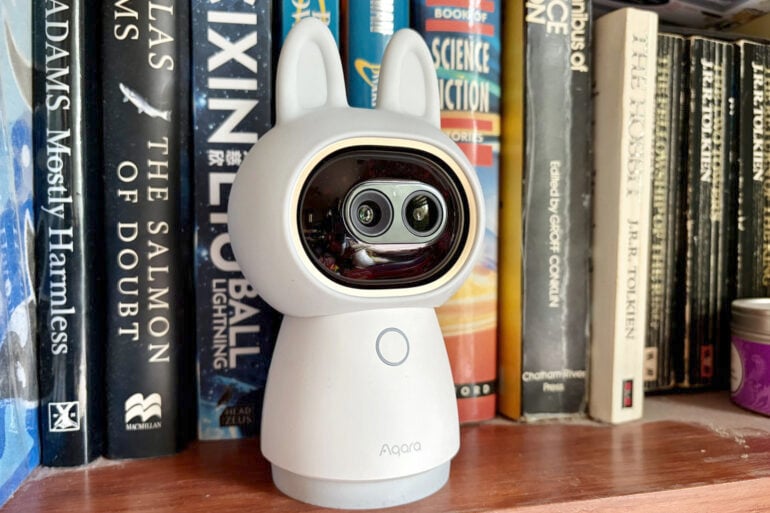
Looking super cute while brimming with advanced features, the dual-lens Aqara G350 camera hub keeps a watchful eye on your home.
There was a time when home security cameras were primarily focused on catching uninvited guests, but these days they’re more about checking in on family and pets left home alone.
Don’t be fooled by the cute bunny ears, the $269 Aqara G350 looks like a basic baby monitor but is actually much more. It can look around, track objects and zoom in, all while supporting the latest smart home standards.
Table of contents
Aqara G350 camera hub first impressions
The Aqara G350 camera hub is extremely cute, although not everyone will appreciate its style. Thankfully, the bunny ears are removable if you’re after something a bit more conservative.
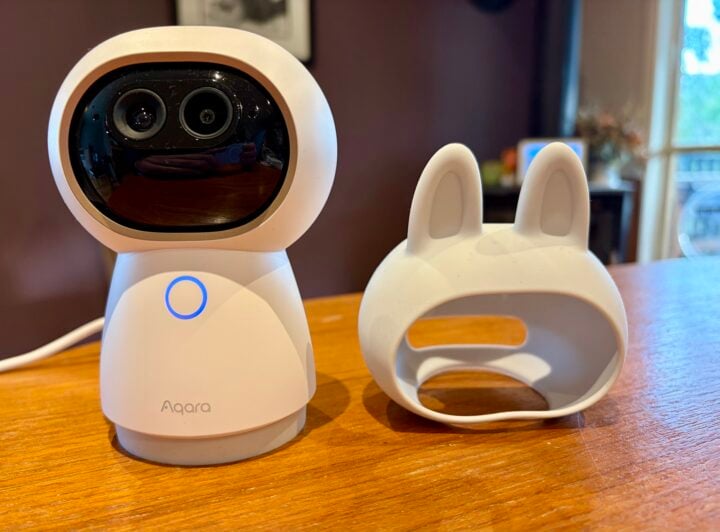
Even then, the camera looks like it’s designed to live on a bedside table. To make the most of it, it belongs in an open living area with a clear view of its surroundings.
The camera stands around 14 cm tall, with a 7 cm circular base, making it roughly the size of a 375 ml can of soft drink. It’s designed to sit on a flat surface and would tuck away nicely on a shelf, although you do have the advantage of a 1/4-inch mounting threaded on the bottom (but no mounting bracket in the box).
While it might not look like much, the Aqara G350 packs an impressive set of features considering its price tag.
For starters, it’s a pan-tilt camera allowing the whole body to rotate 180 degrees left or right. Its movement is completely silent, so as not to draw attention to itself.
This means you get a full 360-degree horizontal view, with a slight fisheye on the wide-angle lens.
While a 360-degree view is great, keep in mind the camera still needs access to AC power, perhaps making it tricky to set up in the middle of a room. It comes with a two-metre USB-C to USB-C cable but no AC adapter, which is frustrating if you don’t have a spare USB-C AC plug lying around.
Meanwhile, the camera can tilt up/down around 45 degrees each way, leaving slight blind spots above and below – falling short of the more flexible Tapo C206 security camera.
Affordable pan-tilt cameras are becoming more common, but what really helps the Aqara G350 stand out is the inclusion of both 4K wide-angle and 2.5K telephoto lenses. With sharp resolutions, they ensure that you get a very clear picture of what’s happening.
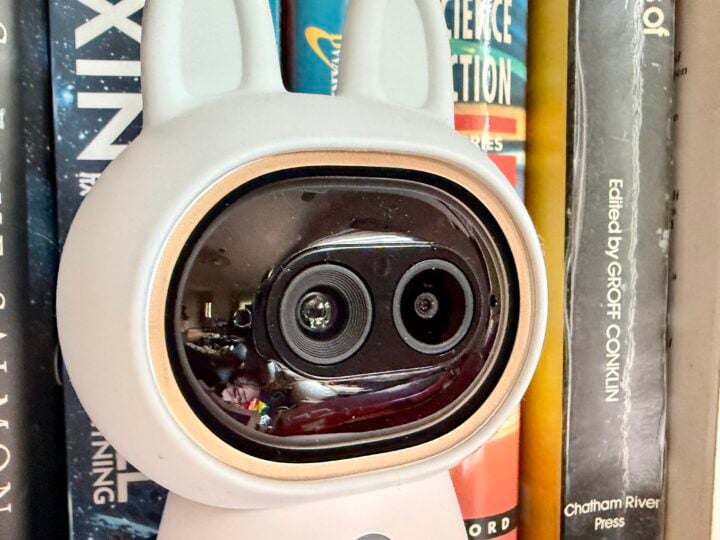
The camera also has a built-in microphone and speaker, plus there’s a function button on the front. It’s for managing connectivity rather than muting the camera/microphone, which will disappoint those who sometimes want their privacy.
The camera does feature a privacy mode, but perhaps not what you’d expect. From the Aqara app, you can roll the little device’s eyes back into its head, revealing two cute closed eyes with the microSD slot for a mouth.
This privacy mode can be scheduled, but it can only be controlled remotely and not by people in the room with the camera, unlike the physical privacy shield on the Ring Pan-Tilt Indoor Camera.
The function button also features a status light, which assists with troubleshooting connectivity and also turns orange to reveal when someone is remotely watching the live feed.
Aqara G350 camera hub specifications and price
| Lenses | 840 × 2160 (Wide-Angle) 2560 × 1440 (Telephoto) 9× hybrid zoom |
| Resolution | 3840 × 2160 (Wide-Angle) 2560 × 1440 (Telephoto) |
| Frame rate | 20 fps |
| Field of view | 133° (Wide-Angle Lens) 43° (Telephoto Lens) |
| Pan/Tilt | 360° pan, 90° tilt |
| Focal length | 2.8 mm (Wide-Angle) 8 mm (Telephoto) |
| Aperture | f/1.6 |
| Night vision | 940nm infrared |
| Audio | Two-way |
| AI detection | People, animals, faces, smiles, voices, and gestures |
| Onboard storage | microSD up to 512 GB Optional network storage, transfer from microSD to NAS |
| Cloud storage | Optional (requires Home Guardian plan) |
| Connectivity | Wi-Fi IEEE 802.11 a/b/g/n/ac/ax 2.4/5 GHz Zigbee / Thread IEEE 802.15.4 Bluetooth |
| Power | USB-C (AC adapter not supplied) |
| Smart home ecosystems | Apple, Amazon, Google, Samsung, IFTTT, Matter 1.5 |
| Ruggedness | Indoor only |
| Dimensions | 123 (plus ears) × 85 × 68 mm |
| Weight | 350 gm |
| Price | $269 RRP |
| Warranty | 1 year |
| Official website | Aqara Australia |
Features
The Aqara G350 camera hub is easy to set up using the Aqara app and QR codes, with extra QR codes for connection to Matter and Apple Home. Be prepared for it to ask for access to a lot of features, such as location, Bluetooth, Wi-Fi, notifications, Apple Home and the ability to find other devices.
Part of the reason the camera requests so much access is that it’s also a connectivity hub. It’s billed as the world’s first Matter-certified camera, which is a low-powered, wireless connectivity standard designed to enable interoperability across smart home ecosystems.
As a hub, Aqara G350 supports the low-powered Zigbee and Thread mesh wireless protocols, acting as a bridge for Aqara devices and other smart home gear.
The camera is also platform-agnostic, working with Apple (including HomeKit Secure Video), Google Home, Amazon Alexa, Samsung SmartThings and IFTTT.
This level of interoperability is still quite rare, making the Aqara G350 a sensible choice if you’re reluctant to lock yourself into one smart home ecosystem. That said, it’s early days for Matter camera support, so your mileage may vary.
By default, the camera sends you a smartphone notification via the Aqara app when something comes into view, with the ability to distinguish people and pets from general movement. You also get the option to snooze notifications for 30, 60 or 120 minutes.
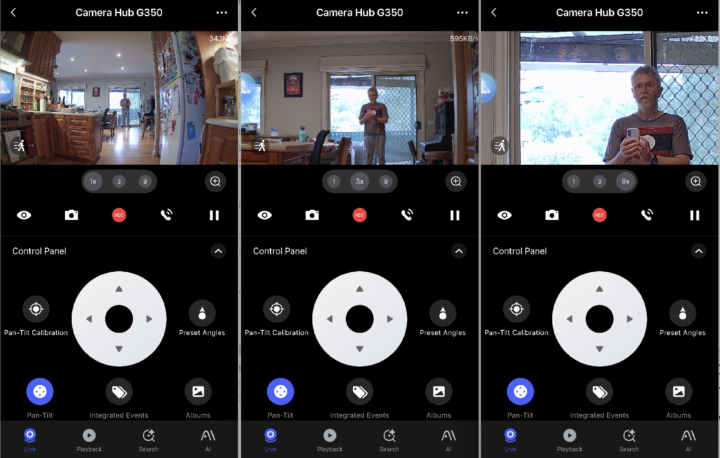
You can click on a smartphone notification to see the live feed or, if you’re too late, an instant replay. When viewing the live feed, the camera interface offers easy access to the plan, tilt and zoom features, including the ability to simply tap on something to get a better view.

From this menu, you can also enable AI-powered Person, Animal and Close-up tracking, which automatically returns to its default position 30 seconds after losing sight of the object. There’s also a configurable Cruise mode that regularly scans the room.
The app doesn’t support creating activity zones to limit notifications, but that’s no great loss considering that activity zones typically don’t adjust when the camera moves.
The camera can even support gesture recognition. You can make the okay sign, with one or two hands, to trigger specific events across the Aqara ecosystem, which includes cameras, doorbells, sensors, controllers, switches and smart locks.
Plus, there’s a creepy-sounding ‘smile detection’, which is seemingly designed to capture happy family moments.
Along with video, the camera also supports two-way audio, which includes the AI-powered ability to detect alarms, crying babies, barking dogs, coughing, snoring and general loud noises.
The camera also supports AI Video Search via keyword, along with AI-written summaries. It’s worth noting that a lot of the AI detection features are labelled ‘Lab’, meaning they are still a work in progress.
To take advantage of all these advanced features, the Aqara G350 comes with a three-month free Home Guardian plan, after which it is priced $4.99 p/m ($49.99 p/a) for one camera or $9.99 p/m ($99.99 p/a) for unlimited cameras.
AI-powered people, pets, faces, lens obstruction, motion and sound detection are available without a subscription. The Home Guardian plan unlocks vehicle and package detection, AI summary and search, and 90 days of cloud video storage.
Quality
The Aqara G350 camera hub does a decent job of tracking movement around the room, issuing alarms for people and pets. Close-up tracking is a bit hit-and-miss, but the gesture control works well.
Manual control of the telephoto lens is certainly helpful for getting a good view of someone’s face on the other side of the room, although it doesn’t cope as well with bright backlights as the wide-angle lens.
The two-way audio quality is also pretty good for speaking to people on the other side of the room.
Sadly, the AI audio detection is less impressive, failing to detect alarms, crying babies, coughing or barking dogs (the last two of which are in Labs). My dogs actually did a much better job of alerting me to all of those sounds.
Who is the Aqara G350 camera hub for?
The combination of pan/tilt controls and wide/telephoto lenses makes the Aqara G350 camera hub an extremely versatile camera – assuming you have a good central spot to install it, with easy access to power.
The AI video detection works well, but the AI audio features seem to be much more of a work in progress. Digging through the menus reveals a wide range of ‘Lab’ features, so it will be interesting to see how the camera’s capabilities improve over time.
The icing on the cake is impressive smart home interoperability, particularly Matter support as both a camera and a hub. This keeps your options open when it comes to committing to a smart home ecosystem, keeping in mind that interoperability isn’t always smooth sailing.
The post Aqara G350 camera hub review: Keep a close eye appeared first on GadgetGuy.
0 (mga) komento:
Mag-post ng isang Komento