


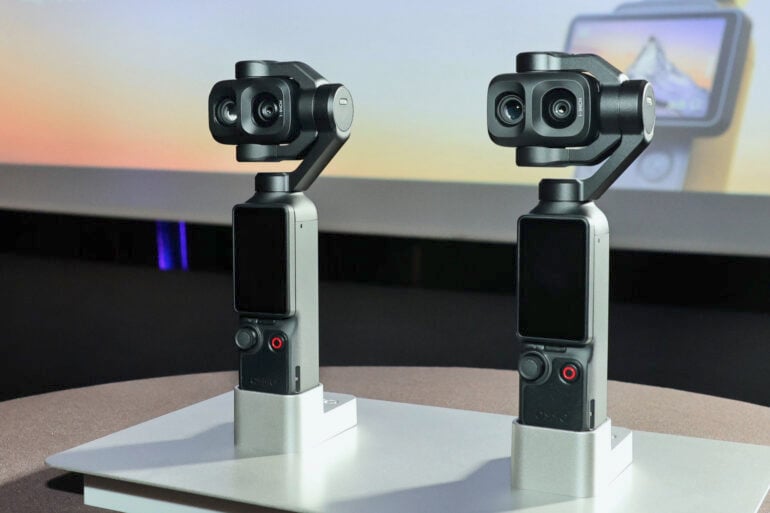
After months of speculation, rumours, and industry whispers, DJI has lifted the lid on the Osmo Pocket 4P, a dual-lens version of its popular portable gimbal camera.
Shown at the Cannes film festival, of all places, the upcoming camera follows the standard Osmo Pocket 4 that DJI launched last month. While many considered last month’s launch to be iterative and a slight upgrade from the wildly popular Osmo Pocket 3, the 4P looks like a more substantial change.
DJI didn’t specify much in the way of specifications or exact technology. Being at Cannes, the focus was more on the type of filmmaking the brand hopes to augment. More natural-looking skin tones and “cinematic depth” were some of the selling points, alongside “improved zoom functionality”.
DJI described the Pocket 4P as wielding a “next-generation imaging system”, without getting into much detail. Both the Pocket 3 and Pocket 4 use a large one-inch sensor, which looks to be consistent with the 4P.
Much of the appeal of the Osmo Pocket series is its built-in gimbal technology contained within a small form factor. Using three-axis mechanical stabilisation, it helps keep shots steady while locked onto a subject.
Before DJI officially confirmed the Osmo Pocket 4P, its rival, Insta360, shared its Leica-powered Luna gimbal cameras, including a dual-lens model. Insta360 teased optical zoom as being a major drawcard for the premium model, although it didn’t specify how far the zoom goes. Based on this, it’s likely that DJI’s dual-lens model will also include some form of optical zoom.
That’s all we have to go on for now; DJI hasn’t confirmed a release date or price yet. Considering the base Osmo Pocket 4 starts at $769 in Australia, expect to pay a bit more for the 4P.
The post DJI finally confirms dual-lens Osmo Pocket 4P gimbal camera appeared first on GadgetGuy.
0 (mga) komento:
Mag-post ng isang Komento