


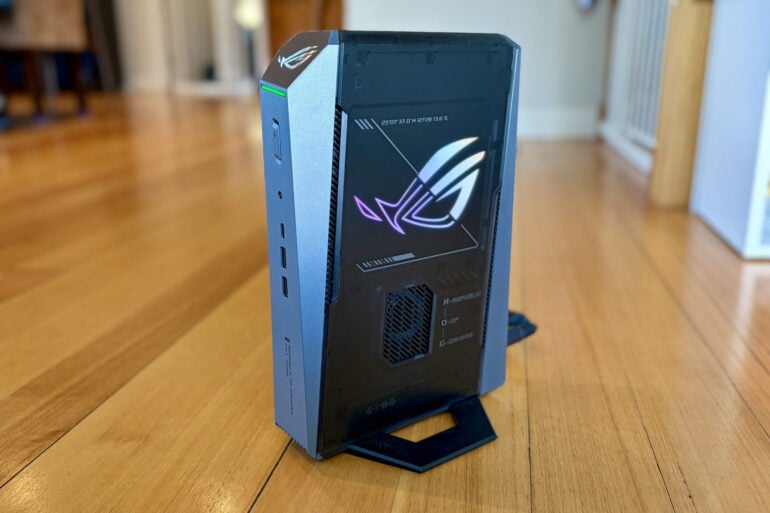
Squeezing serious firepower into a tiny package, the Asus ROG GR70 is a mini gaming rig with serious credentials.
Gaming PCs have traditionally been big, clunky and noisy beasts, with serious players more than happy to boast about the size of their rig. Rather than settle for an office-style plain beige box, they add glass side panels and internal neon lights to show off all that grunt under the bonnet.
Part of the reason for opting for a full-sized tower or desktop case is to ensure room for a giant top-shelf graphics card. A roomy case also allows for fans and plenty of airflow to stop your components melting when the going gets tough.
Another reason for favouring a full-sized case is to ensure easy access for upgrading individual components over time, to make sure your Gaming Rig of Theseus can cope with tomorrow’s AAA titles.
Of course, not everyone needs so much grunt under the bonnet. That’s why the concept of the mini PC was born, such as Intel’s Next Unit of Computing (NUC).
Small, inexpensive, quiet and low-powered, these little PCs were originally designed to handle lightweight everyday computing tasks. Over time, it became easier to build more powerful NUCs, with Asus taking over Intel’s NUC division to produce pint-sized powerhouses including gaming rigs for its Republic of Gamers (ROG) brand.
In a surprising twist, the $6,309 ROG GR70 mini PC is Asus’ first gaming NUC to run an AMD processor rather than Intel, which is why it doesn’t actually bear the NUC name even though it looks the same.
Asus ROG GR70 first impressions
The ROG GR70 is not what you expect from a gaming PC. It might be blasphemous to say, but out of the box the 3-litre chassis stands a foot tall and looks more like an upright gaming console than a gaming PC.
The ROG GR70 is heavier than it looks at 2.75kg, but that’s still more manageable than most gaming PCs. You’ll appreciate it if you want to take your rig on the road to a convention or LAN party.
Relying on an external power supply is a common engineering trick to help keep PCs compact and cool. The hefty 970g power adapter included with the ROG GR70 will weigh you down if you’re looking to lug it around.
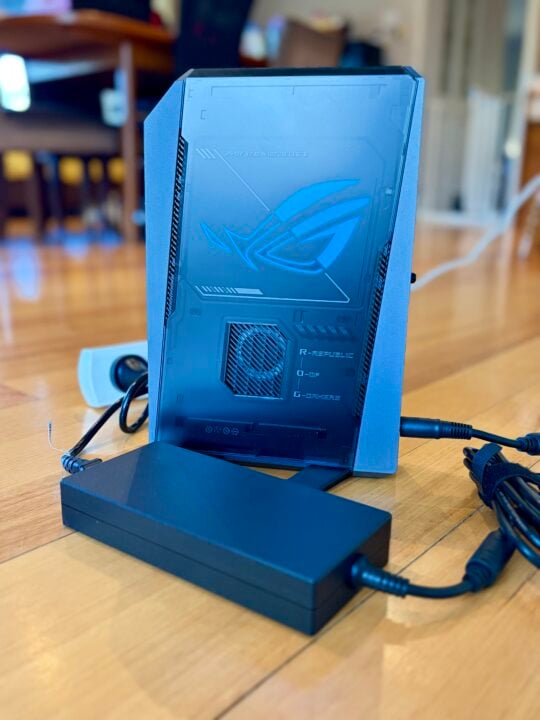
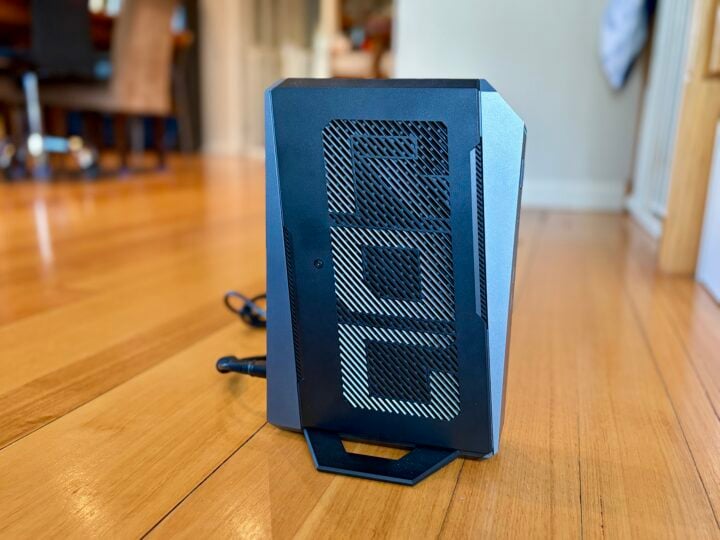
The compact design doesn’t allow for a glass side panel at the ROG GR70’s innards, but it still has bling. There’s a multi-coloured glowing ROG logo on one side and a multi-coloured glowing power light on the front. On the other side, you’ll find ROG etched into the grill.
You can create custom lighting effects using Asus’ Armoury Crate app, which also offers extensive hardware management, as does the highly configurable ROG BIOS.
As you’d expect, there’s no shortage of connectivity options front and back.
Around the front you’ll find two USB-A 3.2 Gen 2 and one USB-C 3.2 Gen 2 ports, accompanied by a 3.5mm Combo Audio Jack.
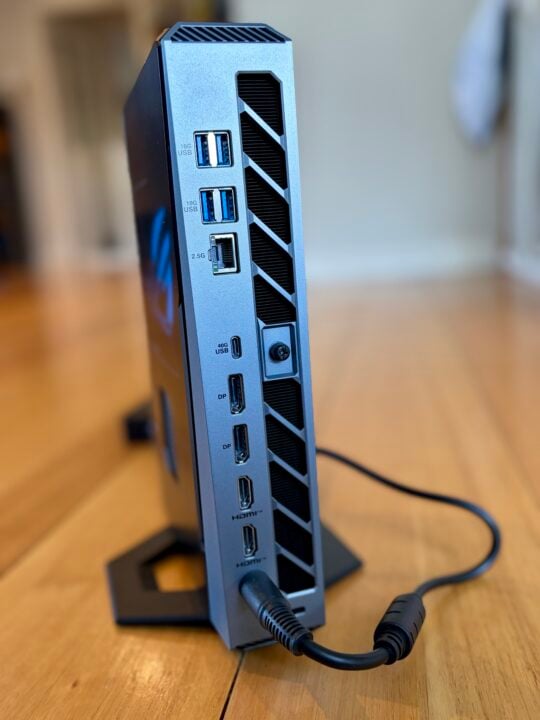
At the rear you’ll find plenty of video options thanks to one USB-C 4 Gen 3 w/ DisplayPort 1.4, two DisplayPort 2.1 ports and two HDMI 2.1 ports to support multi-display set-ups.
The lack of a dedicated audio-out on the rear is a surprising omission, considering some people might want to run it directly into a sound system that might not support HDMI in.
You’ll also find four USB-A 3.2 Gen 2 ports and a 2.5Gb Ethernet port on the back, plus there’s built-in Intel Killer Wi-Fi 7 BE1750x (Gig+) and Bluetooth 5.4.
Asus ROG GR70 specifications and price
| Processor | AMD Ryzen 9 (8940HX cTDP 60W or 9955HX3D cTDP 70W) |
| Graphics | Discrete: RTX 5070 Laptop GPU 8GB GDDR7 RAM or RTX 5060 Laptop GPU 8GB GDDR7 RAM Integrated: AMD Radeon 610M (RTX 5070 models) (No integrated graphics in RTX 5060 models) |
| RAM | Included: 16GB or 32GB DDR5-5600 SO-DIMM Max Capacity: 96GB DDR5-5600 (DDR5-5200 max speed on 8940HX models) |
| Onboard storage | Included: 1TB or 2TB M.2 NVMe PCIe 4.0 SSD Supported: 512B-2TB M.2 2280 NVMe PCIe 4.0 x 4 SSD or 1TB-2TB M.2 2280 NVMe PCIe 5.0 x 4 SSD |
| Ethernet | Realtek RTL8125BG, 2.5G |
| Wi-Fi | Intel Killer Wi-Fi 7 BE1750x (Gig+) |
| Bluetooth | Bluetooth 5.4 |
| I/O ports front | 2x USB-A 3.2 Gen2 1x USB-C 3.2 Gen2 1x 3.5mm Combo Audio Jack |
| I/O ports rear | 1x USB-C Gen 4 w/ DisplayPort 1.4 2x DisplayPort 2.1 2x HDMI 2.1 4x USB-A 3.2 Gen 2 1x 2.5Gb Ethernet LAN 1x DC Input (ASUS rectangle jack) 1x Kensington Lock |
| Operating system | Windows 11 Home or Pro |
| Power supply | 330W AC adapter |
| Dimensions | 282.4 x 187.7 x 56.6mm |
| Weight | 2.75kg plus 970g power supply |
| Price | Starts at $4,479 Review unit: $6,309 |
| Warranty | Three years |
| Official website | ROG Australia |
Features
Under the bonnet, the ROG GR70 packs either an AMD Ryzen 9 8940HX laptop processor built on Zen 4 architecture, or a Ryzen 9 9955HX3D laptop chip built on Zen 5 architecture. The latter is a serious chunk of silicon sporting 16 cores, 32 threads, a 2.5GHz clock speed and 5.4 GHz boost.
Asus actually lists 10 variants of the ROG GR70 on its website, but it looks like two are available in Australia: the $4,479 GR70-N90055AN packing the Ryzen 9 8940HX and the $6,039 GR70-N90056AN packing the Ryzen 9 9955HX3D.
As the 3D gaming variant, compared to the standard 9955HX, the 9955HX3D doubles the L3 cache to 128MB shared (with 3D V-Cache). It’s worth noting that it sports the 9955HX3D, while Asus’ specs simply list it as the 9955HX.
It’s AMD’s top-of-the-line laptop CPU, except perhaps for the Ryzen AI 9 HX 370, which features an onboard NPU.
This processor has some serious firepower, but take note that we’re talking about AMD’s mobile processors designed for high-performance laptops. To be fair, the Ryzen 9 9955HX3D can put many desktop CPUs to shame.
Even so, the elegant compact form factor has its thermal and power limits. You’re sacrificing the extra potential performance of a desktop processor, which requires a case with more room to breathe.
Accompanying that processor is 16 or 32GB of DDR5-5600 RAM, with maximum support for 96GB at 2 x 48GB. (Side note: the review unit actually came with 64GB of RAM)
When it comes to graphics grunt, you’ve got a discrete Nvidia GeForce RTX 5070 GPU built on Blackwell architecture, which is a heavy hitter but not the best Nvidia has to offer.
It handles the high frame rates in demanding titles, plus it supports full ray tracing and the controversial DLSS 5, which can insert multiple AI-generated frames in an effort to improve image quality.
Once again, keep in mind that we’re talking about the laptop variant, which doesn’t match the performance of the desktop RTX 5070. It’s a shame it’s limited to 8GB GDDR7 RAM when the RTX 5070 goes up to 12GB and other GPUs even higher.
Also keep in mind that, unlike a desktop rig, there’s no ability to upgrade the ROG GR70’s CPU or GPU down the track.
The side panel is surprisingly easy to remove, but all you can swap out is the RAM and SSD. Not that you’d be in a rush when it comes with a 2TB M.2 2280 NVMe PCIe 5.0 SSD and 32GB DDR5-6400 RAM.
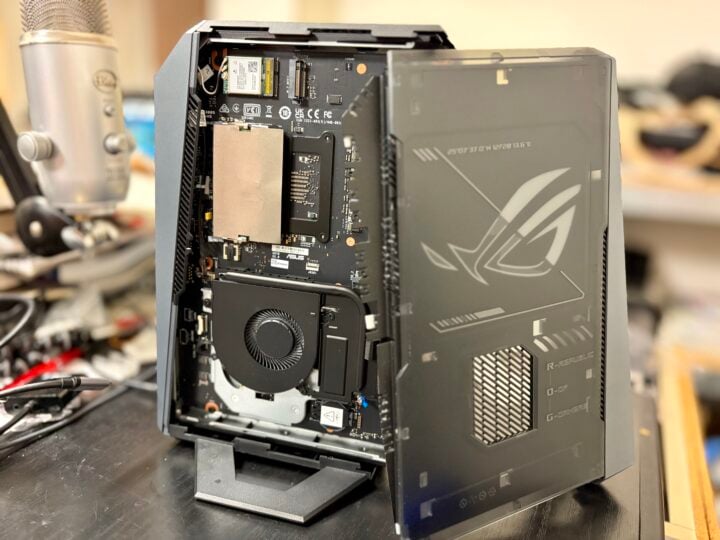
For this kind of money, you might hope for some more future-proofing, but once again it’s the price you pay for the compact design.
Keeping everything cool is a QuietFlow cooling system with three fans and a dedicated SSD heatsink.
If money is no object, you might look to the insane $8,999 Asus ROG 16 Edition 20, which ups the spec sheet in many ways but is absolute overkill.
Quality
As you would expect, the Asus ROG GR70 is no slouch when it comes to benchmarks. There’s some serious gaming firepower within, but it’s not a world beater.
The fan noise barely increases when running Geekbench CPU and GPU tests. Geekbench 7 returns 2,914 single-core and 24,233 multi-core, along with 124,197 OpenCL from the discrete Nvidia GPU and 6,138 OpenCL from the onboard graphics.
Geekbench 6 returns 3,219 single-core and 20,318 multi-core, along with 144,369 OpenCL from the discrete NVIDIA GPU and 5,760 OpenCL from the onboard graphics.
When it comes to gaming benchmarks, 3DMark tells a respectable story but isn’t best-in-class for what you can squeeze from this CPU/GPU combo:
| Steel Nomad | Steel Nomad Light | Time Spy | |
|---|---|---|---|
| Score | 3,076 | 13,995 | 13,708 |
| Frames per second | 30.76 | 103.67 | N/A |
Meanwhile, Shadow of the Tomb Raider’s in-game benchmarks saw the internal fans hit their stride. In return, it delivered 200 fps on the High preset and 177 fps on Highest, which cranks up texture filtering, shadow quality, ambient occlusion, depth of field and level of detail.
All up in terms of performance, the Asus ROG GR70 can hold its head high among mid-to-high-range laptops. Keep in mind, these are only respectable mid-range scores for a desktop gaming rig.
Who is the Asus ROG GR70 for?
As a compact gaming rig, the ROG GR70 is hard to beat, with an elegant design containing plenty of CPU and GPU firepower for a machine running on laptop hardware.
That said, it’s very expensive, so the big question is whether you actually value its size and portability.
If you tend to lug around your gaming rig, or simply don’t have much room to spare on/under your desk, then the ROG GR70’s compact design might be money well-spent. But if your gaming rig is house-bound and has plenty of room, then a desktop PC would likely offer more bang for your buck, with the added flexibility to upgrade any component over time.
The post Asus ROG GR70 Mini PC review: Compact gaming powerhouse appeared first on GadgetGuy.
0 (mga) komento:
Mag-post ng isang Komento